
Newest members
How to join
Craftland can currently be installed via two methods:
- Through our dedicated launcher, the whole modpack can be installed with a few clicks! Additional content such as custom texture packs can also be downloaded via this launcher, and has the added bonus of improved performance. Installation is in a separate directory, so will not interfere with your other Minecraft installs.
- Through the Technic Launcher, the modpack can be installed alongside other modpacks you have!
We then recommend you register by typing "/register", giving you access to our forums, a website account, and many other useful features.
For more in depth details, please see the wiki page on How To Join.
If you have any problems, please contact us via Discord through the links above.
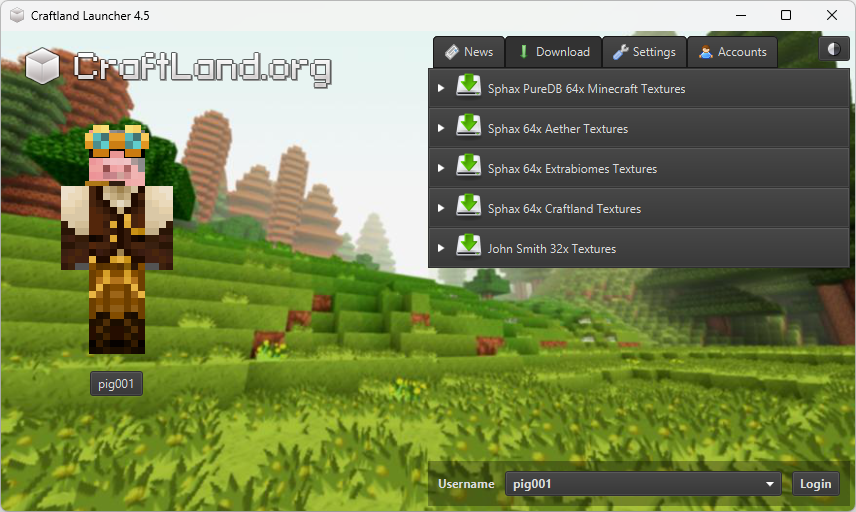
Preview of Craftlands launcher
Download the Craftland Launcher
Craftland Launcher 4.0 (x64)
Download for Windows
8894 downloads
Download for macOS
4175 downloads
Download for Linux
4115 downloads
Version 4 adds support for connecting with a Microsoft Account. Java is no longer required to be installed as this version contains a modern Java Runtime.
Download on Technic Launcher

Legacy Craftland Launcher
This version is deprecated. It will soon not be supported.
 |
Download .jar | 30757 downloads |
 craftlandloader.jar on Virus Total craftlandloader.jar on Virus Total
|
||
 |
Download .exe | 81158 downloads |
|
Craftland.exe on Virus Total
|
||
 |
Download .app | 12946 downloads |
|
Craftland.app.zip on Virus Total
|